Command logs
A live, session-scoped log of every command you run — queries, dbt and SQLMesh runs, and Python — with output, status, and timing.
Overview
Command logs is a running record of the commands you execute during a session. Every run appends an entry with its output, status, and timing, so you can see at a glance what ran, how long it took, and whether it succeeded. It covers four kinds of command:
- SQL — queries run from console tabs and SQL files.
- dbt —
run,test,build,compile, and other dbt commands. - SQLMesh —
plan,test,render, and related commands. - Python: cells run in a Jupyter notebook.
Schema browsing, opening files, and UI navigation are not commands and are not logged.
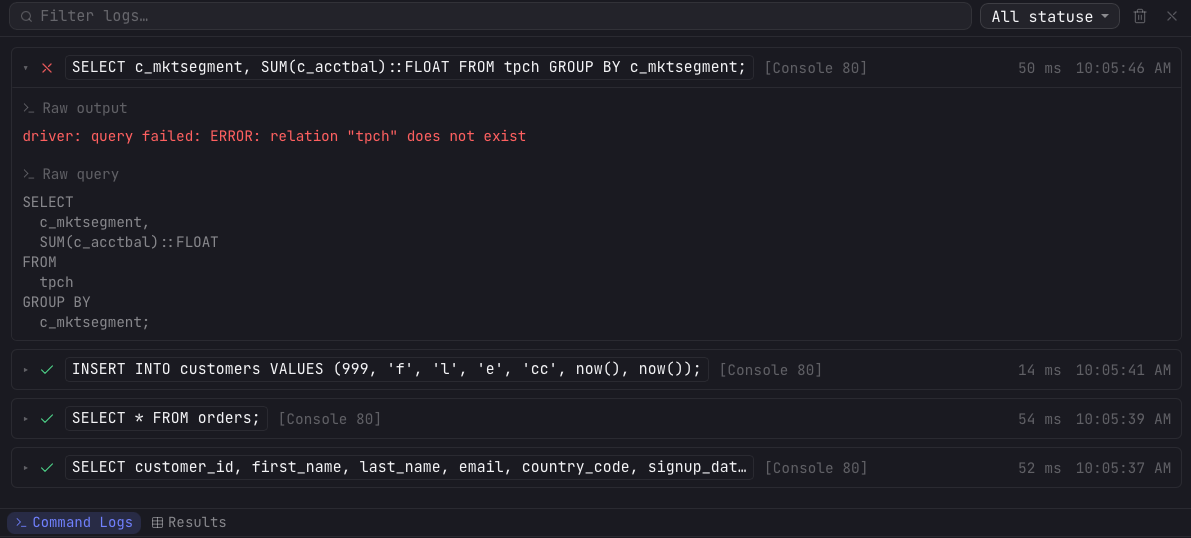
Opening the panel
Command logs live in the bottom pane, alongside the results. Click the Command Logs tab in the results footer to show it. The pane surfaces automatically whenever a command runs, so a long dbt build or query streams its output into view as it happens.
What a log entry shows
Each entry has a header that is always visible:
- Status — a spinner while running, then a check on success or a cross on error.
- Command — a one-line label: the SQL text, the dbt or SQLMesh command, or the first line of Python.
- Source tab — a badge naming the tab the command came from.
- Duration — how long the command took, once it finishes.
- Timestamp — the wall-clock time it started.
Click an entry to expand its body. The newest entry is expanded by default. The body shows:
- Per-node breakdown — for dbt and SQLMesh runs, a table of each node with its type, status, and duration.
- Raw output — the verbatim console output, with ANSI colors preserved.
- Full query — for SQL entries, the executed statement, with a toggle to expand long queries.
Filtering & clearing
A search box filters entries by command text or output, and a status dropdown narrows to running, succeeded, or failed commands. Clear logs empties the panel. Entries are listed newest first.
Session-only, never persisted
The log lives in memory for the current session only. It is never written to disk, never sent anywhere, and has no retention setting. Quitting and reopening Arris starts with an empty log, and clearing the panel discards every entry immediately.